Every case runs on documents. Medical records and bills. Pay stubs. Photos from the scene. The police report. The letter from the insurance company that the client found in their mailbox last Tuesday.
And for most of them, the firm is waiting on someone else. A provider has to release the records. A court system has to post the filing. Most of all, a client has to find the paper, scan it or take the picture and send it in. A case moves only as fast as its documents do.
At CX Summit this fall, Tom Giordano, a founding partner of Pond Lehocky Giordano, shared what that wait costs. In Pennsylvania, workers' comp documents live in a closed state system with no way to connect to it. Staff used to log in and pull every file by hand.
Twelve hundred hours, just to get documents into the building. That's before anyone has read one.
Documents are the raw material for everything else
Documents and the unstructured information inside them feed nearly every other system a firm runs: the case management system, the demand, the medical chronology, and every AI tool on the back end. When the information going in is messy, everything downstream inherits the mess.
Shawn Lehocky, CEO of Pond Lehocky Giordano, put it plainly on our Buy, Build or Partner panel:
So the question isn't just how fast documents arrive. It's what shape they're in when they do.
The ladder we've been climbing
At Case Status®, we've been working on documents one rung at a time. Here's a quick look at what's already solved.
Rung 1: From unsent to sent
Most of the documents a case needs come from the client, and even a lot of the medical paperwork passes through their hands first. When clients are already using one app to follow their case, asking for a document is just another message in the thread they already check. No hunting for an email address, no "did you get my fax?"
Rung 2: Less friction getting it sent
A client shouldn't need a scanner, a fax machine or a PDF converter to help their own case. In the app, they can snap a photo, scan a document with their phone's camera or upload a file they already have, right in the conversation with their legal team.
Rung 3: Knowing it arrived
"Did you get it?" is one of the most common calls a firm takes. Clients now get confirmation on their end that their document came through, so they aren't left wondering and your team isn't fielding the follow-up call.
A tip for clients with a pile of paperwork
Not every document lives on a phone. If a client has records sitting in their email or saved on their computer, they don't need to forward everything to their phone first. They can log in to Case Status from any web browser on their desktop and upload straight from there.
The rung that's left: uploaded isn't understood
Here's what happens after the upload. A file lands on the case called "Image 178." Or "Scan_0042.pdf." Or "Document (3)." Someone on your team has to open it, figure out what it is, decide whether it's what they asked for, rename it and file it. Then it gets synced to the case management system or uploaded again into whichever back-office tool needs it.
Multiply that by every upload on every case and it adds up fast. Nikki Montlick, president of Montlick Injury Attorneys, described the kind of work her firm wants to take off people's plates:
Patrick Iyampillai, co-managing partner of Hale Law, named the trap to watch for in any tool you buy: "automation that still needs a paralegal to retype the data." And Shawn Lehocky pointed out how a time savings can quietly disappear. A task drops from ten minutes to two, but then the document comes back in an email and still needs to be uploaded, and suddenly you've saved two minutes, not eight.
A document that has been uploaded but not understood is still work waiting to happen.
Rung 4: Why we built Document Intelligence
Picture one case on one afternoon. A photo of a pay stub, a 30-page medical record and a court notice all arrive within a couple of hours. Today, someone has to open each one just to learn what it is. At one of our pilot firms, that's around 2,000 uploads a week.
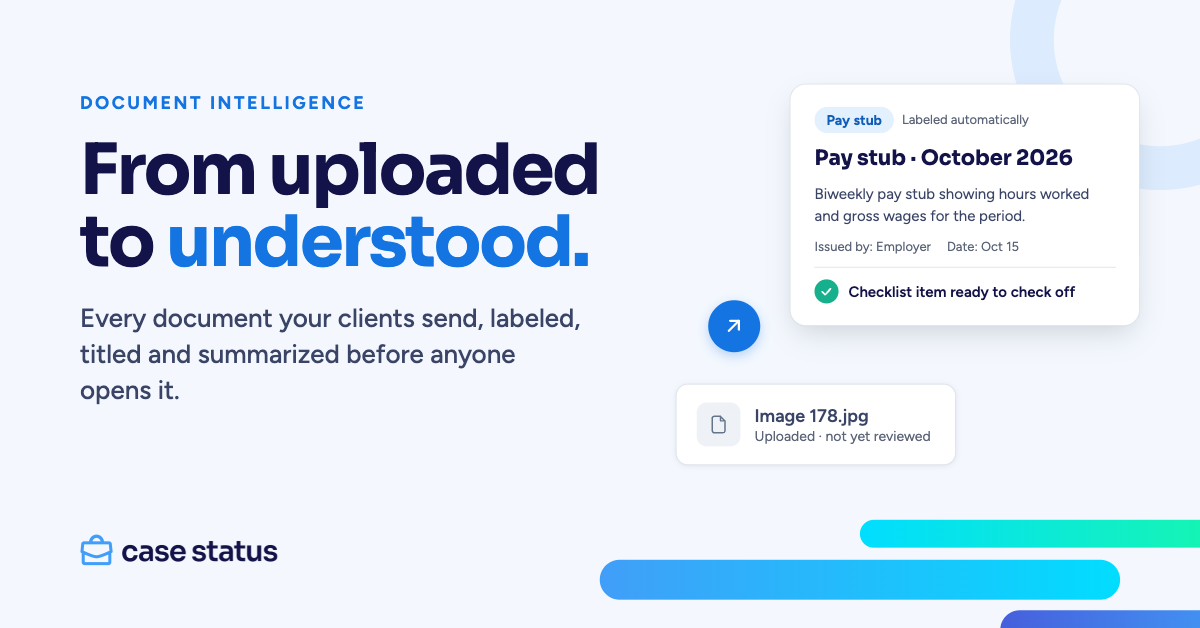
Document Intelligence does that first pass for your team. When a document is added to a case in Case Status, it gets a label, a clear title and a short summary, so staff know what arrived without opening every file.
How it works
- A document is added to a case. Whether the client uploads it or your staff does, it's picked up automatically.
- It's read and labeled. Each document gets a label from your firm's own list (pay stub, bank statement, court notice and so on), plus a suggested title, a short summary and key details like who issued it and the date.
- Your team sees it. The label and summary show up on the case's Documents tab and on the file in the message thread. Staff can search by what a document says, not just its file name, and keep the suggested name in two clicks.
- The label can travel with it. For firms on Filevine, Litify, MyCase, Smokeball or Docketwise, we can turn on sending the label along with new documents into the case management system, so they land where they belong.
Rung 5: From understood to done
Knowing what arrived is good. Knowing what to do next is better. When a document's label lands, Triage can suggest checking off the checklist item that document satisfies. The medical release you asked for came in, so that step is done, and the case keeps moving.
This is where firms are already seeing the payoff of reading documents automatically. Michael McCready, managing partner of McCready Law, described what happens when a new file is opened at his firm:
Brian Page, chief legal officer at Trust Guss Injury Lawyers, shared a similar story. A Harris County court issued a 27-page order listing only case numbers, reassigning cases across divisions. Finding which ones belonged to his firm would have meant four or five hours of manual review. A paralegal used AI to check it against the firm's open cases in about 30 minutes.
That's the ladder: unsent, then uploaded, then understood, then acted on.
Built to be trusted
Your team won't use what they don't trust, so Document Intelligence is built with that in mind:
- Staff only. Labels and summaries are never shown to clients.
- Your labels, not ours. It picks from your firm's own list of document types.
- Sensitive numbers stay out. Social Security numbers, account numbers and dates of birth are left out of the key details.
- Your team stays in the loop. Staff can give a thumbs up or down on every label and summary, and rename any file themselves.
Michael McCready made the same point on stage: these tools need a human watching the output, because a miss early in a case can carry through every step after it. Brian Page summed it up best:
Document Intelligence is in beta now, and we're turning it on for firms that ask. If you'd like it for your firm, talk to your Customer Success Manager.
Start Monday
Shawn Lehocky left the CX Summit audience with simple advice: "Structure your data today, start today, start Monday." Every document that arrives labeled, summarized and ready to act on is a step in that direction.
See it live. Join us for XOS Office Hours: Document Intelligence on Wednesday, November 18 at noon ET. We'll walk through how it works and answer your questions. Register here.